Showing posts with label messaging & chatting. Show all posts

Thursday, August 1, 2013

whatsapp+ v4.0.0

Requirements: Android OS 2.1 +
Overview: What is WhatsApp+? Basically it is a customizable WhatsApp where you can change lots of colours, sizes, and many other visual MODs In addition you can increase upload media limit (stock limit is 16Mb) to send large music files or videos.

 whatsapp+ v4.0.0 https://app.box.com/s/sxzij79uljgm0a2bnxgj

You can increase quality of pictures sent (by default resolution is decreased quite a lot) You can share music just with one click You can add contact profile pictures to their chats You can hide contact profile pictures and show phonebook pictures (in chat screen) Built-in theme viewer and downloader. Check WhatsApp+ users themes online and apply theme if you like And more to come Remember to previously uninstall whatsapp if you come from the official version (if not you will get the "not installed" error)
____________

Changelog v4.00 (26/07/2013)

Base updated to web version: 2.11.7 (connection improvements with Wi-Fi, add image multi-send capability, fix battery drain issue related to wakelocks, bug fix for notification tones on sd cards, miscellaneous bug fixes, translations and improvements)
New Bubble: CARD (thanks to djsubtronic)
Added Dutch & Portuguese BZ translation. Added Hindi (75% translated). Arabic updated and improved
 

Wednesday, July 31, 2013

cloud sms v2.1.15

Read and Write SMS messages right from your Android tablet!

cloud sms v2.1.15 https://app.box.com/s/hfwkifaxsfv6vdjszp0x


Cloud SMSplay.google.com.cloudsms
Tired of putting down your Android tablet to check a new SMS on your phone? Me too. Cloud SMS is run on both your phone and tablet to allow you to send and receive SMS messaging from your tablet. My design goal was to build upon the stock Android Messaging app feel, with simplicity in mind.

This app works over the Internet and does not require bluetooth, does not share (or transmit) your contacts, and even hashes your account email for added security. All messages are transmitted over HTTPS with a high level of encryption for an added measure of security and privacy.

Setup Requirements:


  • Install and run on tablet.
  • Install and run on phone.
  • All done - send your first SMS from your tablet!

Looking to send a message to a phone number instead of a contact? *
Open Settings and change the Contact List Style to Contact Search / Number Entry. This option allows you to choose a contact by name with auto-complete, or by entering a phone number for the recipient.

Important Notes:

  • You will need to have the same Google account on both devices. If you have multiple accounts, you may have to select the correct account in settings.
  • MMS is not supported at this time, but will be added in the future.
What's in this version :
  • Added support for Android 4.3!

path v3.1.3

Requirements: Android 2.3.3+

Path v3.1.3  https://app.box.com/s/tvrhg497eitr3w81vfgc


Requirements: Android 2.3.3+

Features:

★ Messaging - The fast, fun, and private way to message your family and friends one-to-one or in small groups. Use your words, your voice, your location, media, stickers, and more!
★ Stickers - Say more in a single tap with handcrafted stickers from some of our favorite artists.
★ The Shop - The hand curated place to find premium photo filters and handcrafted stickers to make your Path experience more you.*
★ Capture photos and use Path-exclusive, custom-designed filters and editing features.*
★ Journal your thoughts, when you're asleep or awake, and check in to places with friends.
★ Share the music you're listening to, the movies you're watching, and the books you're reading.
★ Interact with your friends' posts: Smile, laugh, gasp, frown at, or love their moments.
★ Crosspost select moments to Facebook, Twitter, Tumblr, and Foursquare.
★ Search - rediscover memories on Path by season, holidays, weather, dates, people, places, birthdays, nearby, and more.
★ Import your photos, statuses, and check-ins from Instagram, Facebook, and Foursquare, and use Path’s search to rediscover them.

* Photo filters and editing features require Android 2.3.3+ with OpenGL ES 2.0.

What's New
What's New for Path 3.1.3
- Ability to change email and password from Settings
- Bug fixes to improve performance
- New Stickers:
-- Adventure Time: With Jake the dog and Finn the human, the fun will never end. It's Adventure Time!
-- ZOMG: Stickers do the talking so you can spend more time laugh-out-louding.
more info at:-

Monday, July 29, 2013

iphone messages v1.36

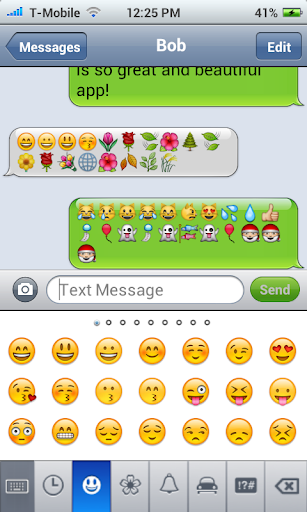
Requirements: Android 2.1 or higher, iPhone messaging application is an iphone style messages. Cool UI as ios. It’s simple to use, just like the iPhone.

iphone messages v1.36  https://app.box.com/s/itxnivd4wwcyknfu8mga

FEATURE:
- Iphone ui style.
- New support emoji ios 6.
- Support all emoji iphone, you can send and receive emoji with friend using iPhone or Android.
- Iphone Style Ringstone support.
- Iphone style popup dialog.
- Blink LED when a new message arrives.
- Customized notification icon.
- Support internal flash.
- Manage the messages accordingly.
NOTE AND ISSUES:
MMS picture problem:
- For those of you who could not send or receive MMS, you can select “multimedia messages (MMS)” option in the iphone message settings, then select the “Settings APN filler”, you can click MMSC / proxy / PORT to see the value, if you can not see anything, you can enter your own settings, you can see in the following path: android 2.3: System Settings -> Wireless & netowrks -> Mobile networks -> APN.
Output order of the problem of message:
- If you do not want to see duplicate notifications, you can try selecting “Service Block” option in the settings, but this will make two duplicate messages on some devices.
- If your message does not work, please try selecting “Notice Block” option in the settings iphone message.
Emoji problem:
- Please click the menu and select “Smile Insert” to insert emoji.
- The version of iPhone IOS user must be> 5.01
- When it comes to SMS, please note that many network operators damage emoji text especially when emoji being sent across networks. Please understand that I can not fix the problem of network support.
Contact problem:
- Please write an email to barleystudio (at) gmail.com to report your question, I will solve you question quickly.
What’s in this version:
v1.24
- Fixed the contact problem emoji popup dialog when a new message, delete the “Message” content.
- Fixed the bug that can not send a message to compose a new message with the Add Contact button.
- Fixed the bug that can not hear the sound iphonetone after doing the update.
- Fixed a Fatal Error can not “send mms” when instant.
More information: Google play

What’s in this version?
1. Fixed the problem of half the size of your thumbnail photo Send mms on any device.
Two. Fixed the bug that can not see the close button the popup dialog.
Three. Changed the icon size around 320×480.
April. High output sound and vibration to the MMS message.
May. Added popup dialog of a new MMS message reception.
June. Added the red button to stop sending message delay.

Tuesday, July 16, 2013

WhatsApp+ v3.98

Basically it is a customizable WhatsApp where you can change lots of colours, sizes, and many other visual MODs
In addition you can increase upload media limit (stock limit is 16Mb) to send large music files or videos
You can increase quality of pictures sent (by default resolution is decreased quite a lot)
You can share music just with one click
You can add contact profile pictures to their chats
You can hide contact profile pictures and show phonebook pictures (in chat screen)
Built-in theme viewer and downloader. Check WhatsApp+ users themes online and apply theme if you like
And more to come

WhatsApp+ v3.98 https://app.box.com/s/f7c7ep0k6j36qvnexi7b


 Have you read WhatsApp+ FAQs yet?: Whatsapp+ FAQs (thanks to frenzyboi)

Changelog v3.98 (15/07/2013)
*MOD 2.1.6 to hide/show own status in Chats Header is back
*Added MOD 2.2.19 Show Contact Status in Chats Screen
*Solved panels gradient bug in contacts screen
*Other minor bugs solved
*(Next Update will use new Play Store base)


Tuesday, July 2, 2013

whatsapp+ v3.85

What is WhatsApp+?

whatsapp+ v3.85

Basically it is a customizable WhatsApp where you can change lots of colours, sizes, and many other visual MODs
In addition you can increase upload media limit (stock limit is 16Mb) to send large music files or videos
You can increase quality of pictures sent (by default resolution is decreased quite a lot)
You can share music just with one click
You can add contact profile pictures to their chats
You can hide contact profile pictures and show phonebook pictures (in chat screen)
Built-in theme viewer and downloader. Check WhatsApp+ users themes online and apply theme if you like
And more to come

Test it! It's free!


Changelog v3.85 (20/06/2013)
*Last release before new base update (2.10.748 coming middle/end of next week)
*Built-in Theme Viewer/Downloader improved: Added an option to search. It also shows now total downloads of each theme
*Backup server links added, in case main server is down (need to be tested/improved)
*Solved some force closes when using chat pics MODs
*Other minor bugs solved 


 Whatsapp+ FAQs

Where is non-holo Whatsapp+?

I have "SMS verification" error.
  • Uninstall Whatsapp+.
  • Install original Whatsapp from Play Store.
  • Go through the setup into the main conversation screen and chat with some friends.
  • Backup your conversation in Option > Settings > Chat Settings > Backup conversations
  • Uninstall original Whatsapp.
  • Install Whatsapp+.
  • Do make sure to restore chats when prompted.

What's the difference between 3.35 and 3.35D?
  • D = Donate version. Allows you to appear offline to others, while reading and receiving chats normally. Donate version works normally like normal version. It just have that "Appear Offline" option. One thing to take note, you'll see others as offline too.

I get "App not installed. An existing package ..." error when updating.
  • From v3.35 onwards, Whatsapp+ was signed with a different key. Thus, you have to uninstall the old version and then install the updated APK. If you get the SMS verification error, read (2).

How do I use Whatsapp on my tablet? [Answers from one of the forum replies]
  • Backup your Whatsapp+ using Titanium Backup or any app backup services. Then transfer the whole backup data to your tablet and restore them.

Does Whatsapp+ gives me a lifetime license?
  • No. Whatsapp+ is just original Whatsapp with themeable options and some tweaks to make Whatsapp more convenient and "attractive" to look at.

Can Whatsapp+ increase the expiration date for free?
  • No. Whatsapp+ is just original Whatsapp with themes options. You have to pay for it when your account expires.

I want to switch rom but don't want to go through (2) again! HAAALP!!!
  • Use TitaniumBackup to backup the whole of Whatsapp+ and restore APP+DATA on your new rom.

Does this app remove the "Last Seen ... [FREE VERSION]"?
  • No. As I said before, this app only adds themeable options so that user can change the way it looks. However, one way to prevent the "Last Seen " is to ..
  1. Close Whatsapp+.
  2. Enable Internet connection [3G/4G/WiFi]
  3. Allow Whatsapp to download message from the server [Whatsapp notifications will popup]
  4. DON'T open Whatsapp! Just let it download the message.
  5. Switch off your internet connection after it's all downloaded.
  6. View message.
How do I save or share themes?
  • Save
  1. Go to PLUS > More (under Themes) > Save pref.
  2. Go into your SDcard, where the themes will be save in SDcard/Whatsapp/PLUS/saved_pref/
  • Share
  1. Copy/Share/Upload your xml + wallaper into somewhere you can access.
  2. Share your themes here.
  3. Be sure to follow the format
  1. XML: "username+theme name" - Eg: rafalense_plus-dark.xml
    • Screenshots: (jpg or png )
      Main/Chats: "username+theme name+_main"
      Eg: rafalense_plus-dark_main.jpg

      Chat: "Nombre de usuario+Nombre de tema+_chat"

      Eg: rafalense_plus-dark_chat.png

      Contacts: "username+theme name+_contactos"

      Eg: rafalense_plus-dark_contacts.jpg
  2. Wallpaper (JPG): "username+theme name+_wallpaper" - Eg: rafalense_plus-dark_wallpaper.jpg
  3. Please do not include full wallpaper, just the one saved with the xml file
  4. Everything together in a zip file and that's it
How do I change header size?
  • This option is removed as Whatsapp now uses the official ActionBar.

How do I copy PART of the message or copy/forward the WHOLE message?
  • Copy part of message : Long press the speech bubble. [native copy-paste method]
    Copy/Foward the WHOLE message : Long press BESIDE the speech bubble.

    To disable it, tick 1.2.2S

How do I remove the ticks on the conversation bubble like the previous Holo Whatsapp+?
  • Tick 1.2.6H in the PLUS settings.

How do I update Whatsapp+?
  • Go into Option > PLUS > Check for Update. Download and install if there's a new version available.

When upgrading, do I lose all settings like colors etc?
  • No. The settings will stay. However, just for precaution, backup your settings [Option > PLUS > More(under Themes) > Save Preferences] so that you can restore your settings if they are accidentally reset.

I can't send photo! It says memory error or something!
  • Your media settings are set too high/100%. Go to Option > PLUS > 5. Media Sharing > 5.3 Image Quality and lower it.

Raf! Can you implement sending of apk, doc and other file types?
  • We all know Rafalense had did a great job in allowing us to send mp3 and increasing the file size allowed to be sent. But my guess is that it will be hard for Raf to implement sending of other file types due to server-sided reasons. However, it's Raf, man! Who knows, only time will tell. Remember, Rafalense modded Whatsapp for theming purposes. Allowing us to send mp3s is already a bonus for us. Instead of asking him to implement stuff, why not we sit back and appreaciate what Raf had done for the community.

    Let's hope the official Whatsapp implements sending of different file types so that Rafalense will be able to mod it, such as sending bigger sized files.

Is Whatsapp+ illegal?
  • No. Whatsapp+ is basically the official Whatsapp - decompiled - throw in awesome tweaks and features - recompiled.

How I can share / pick music ? I Click Share > Music but WA+ says 'there is no associated activity to perform action'. I installed PowerAmp or other music player
  • Install 'Android Music Player' from market. Not every music player can pick music.

Everytime I open Whatsapp+, it checks for update automatically even if I'm on the latest version. Any way to stop it?
  • Option > PLUS > 6. Other Mods > Uncheck 6.0 [Auto-Updates]

I have suggestions for Whatsapp+. Like Chatheads etc. Should I leave a comment on the thread?
  • If it's related to themes and [provided] someone else did not suggest this previously, yes. Reply once and that's it. Else, no. Rafalense will try and go through your suggestions and act accordingly.

Can you please update Whatsapp+ more frequently?
  • Rafalense is not your personal modder. He does this out of his own free time, out of his busy schedule. Give him time. I'm sure he'll release awesome updates. Be sure to to him so you can receive early release of Whatsapp+ before the others do.