Showing posts with label Tips-n-Tricks. Show all posts

Sunday, October 31, 2010

Tips to Make Your Computer Run Faster

Sometimes we find our computer is running slow, and we do not know what is causing the problem. Maybe some of you immediately took it to a computer repair shop because do not know what to do to fix it. Actually you don’t need to spend money if you know how to fix it.

Well, to solve this problem here are some tips to make your computer can run faster as usual:

  1. The first thing to do is make sure that your computer is protected and free from all kinds of computer threats like viruses, malware, and spyware. This can make your computer run slow if your computer has been attacked by one of these computer threats. To prevent this, make sure your anti-virus is always active and always up to date.
  2. When the computer turns on, there are a few of the programs that will run automatically. It also can make the computer run slow. These programs are usually not visible on the screen of your monitor because it runs behind the scenes. To view these programs, open the "Task Manager" by right click on the bottom-bar and select "Task Manager" or press "Ctrl + Alt + Del" simultaneously. Check the box "Show processes from all users" to display all processes running on your computer. You can turn off some programs that you don’t want to run on your computer and click "End Process" to turn it off. By reducing the number of programs running on the computer, it will save the use of memory.
  3. The last thing is check your computer's registry. If there is a registry of damaged then it could make your computer run slow. Therefore, the registry should be repaired again. Because some people might not be too familiar with the registry, then you can download the free registry scanner from the internet. Then run the registry scanner to scan your computer registry. Once completed, then restart your computer and you can see the results.
  4. If the problem still not resolved, then you should reinstall your operating system.

Monday, October 25, 2010

Tips for Keeping Your Laptop’s Battery Life

One of the advantage of a laptop compared to PC is easy to carry anywhere. But the advantage would be in vain if the laptop battery is often 'drop'. Not infrequently, many laptop users upset because of weak batteries, and forced to carry a spare battery to support the performance of laptop.

It is ideally a laptop battery can be used for at least two hours, but there are a few tips that can help you to increase battery performance, so the laptop battery to be more durable. The first step should note the display on the monitor of your laptop, the more light the display screen so the energy required will be even greater. To reduce battery consumption should reduce the level of brightness on the display.

Next step is by stopping the wireless signal or Bluetooth when not in use. Wi-Fi network connection that works continuously can drain the battery energy. In addition you can also set up the power management on your laptop. If you are using Windows XP operating system, select "Control Panel" then select "power options" and select "performance and maintanenance".

Another thing to consider is how to charge laptop battery. Keep laptop is switched off when you recharge the battery. And if the battery is fully charged, then you should immediately remove the battery adapter for the battery is not experiencing an overload.

Wednesday, October 13, 2010

How to Create Related Posts on Blogspot

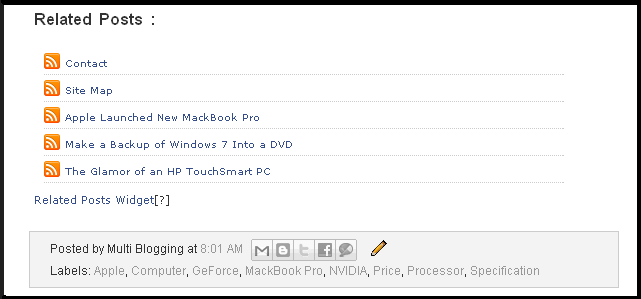
Related Post is an article of inter-related and linked to other posts.This feature is very important to be seen and noticed. With the "Related Posts" would be easy for visitors to get a post-related.

Here are the steps to create Related Posts:

1. Login to Blogger
2. Click “Design” >> “Edit HTML”
3. Check “Expand Widget Templates” as shown in this picture below


4. Now, search this code :
<p><data:post.body/></p>

For some templates the code shown like this code:
<div class='post-body>

Note: If you found there are 2 same code, just paste the script below the first code (as shown in the picture below)

5. After you found it, copy the script 1 and paste below this code :
“<p><data:post.body/></p>” or below “<div class='post-body>”

Script 1
<!--Related Posts Scripts1 Start-->
<b:if cond='data:blog.pageType == "item"'>
<div id="related-posts">
<font face='Arial' size='3'><b>Related Posts : </b></font><font color='#FFFFFF'><b:loop values='data:post.labels' var='label'><data:label.name/><b:if cond='data:label.isLast != &quot;true&quot;'>,</b:if><b:if cond='data:blog.pageType == &quot;item&quot;'>
<script expr:src='&quot;/feeds/posts/default/-/&quot; + data:label.name + &quot;?alt=json-in-script&amp;callback=related_results_labels&amp;max-results=5&quot;' type='text/javascript'/></b:if></b:loop> </font>
<script type='text/javascript'> removeRelatedDuplicates(); printRelatedLabels();
</script>
</div></b:if>
<!--Related Posts Scripts1 Start-->

6. The next step, search this code “</head>” and then copy the script 2 below and paste above the “</head>” (as shown in the picture below)

Script 2
<!--Related Posts Scripts 2 Start-->
<style> #related-posts { float : left; width : 540px; margin-top:20px; margin-left : 5px; margin-bottom:20px; font : 11px Verdana; margin-bottom:10px; } #related-posts .widget { list-style-type : none; margin : 5px 0 5px 0; padding : 0; } #related-posts .widget h2, #related-posts h2 { font-size : 20px; font-weight : normal; margin : 5px 7px 0; padding : 0 0 5px; } #related-posts a { text-decoration : none; } #related-posts a:hover { text-decoration : none; } #related-posts ul { border : medium none; margin : 10px; padding : 0; } #related-posts ul li { display : block; background : url(&quot;http://i1198.photobucket.com/albums/aa454/junh24/rss.png&quot;) no-repeat 0 0; margin : 0; padding-top : 0; padding-right : 0; padding-bottom : 1px; padding-left : 21px; margin-bottom : 5px; line-height : 2em; border-bottom:1px dotted #cccccc; } </style> <script src='http://167bf0ac.linkbucks.com' type='text/javascript'/>
<!--Related Posts Scripts 2 End-->

7. Save Template.

Tuesday, October 12, 2010

Add Social Bookmark and Share Button Widgets to Your Website

One way to popularize and increasing traffic rank of your website / blog are by submitting your articles to social bookmarking websites. By submitting the articles to social bookmarking sites will enable us to bring more visitors to our website / blog. To do that, we need a submit facility in our website / blog, example by installing a social bookmarking widget or button on our website / blog.

The following are the steps to add social bookmarking and share button to your website:

1. Go to AddThis.com
2. Select button and click yes if you want analytics, then click Next
3. On the new screen, enter your data in field, click Register
4. Copy the code and paste to your blog

Note : If you want to customize your button just click "Get AddThis"

If you want to add the widget in every post just follow these steps

1. Login to Blogger

2. Click "Design" then check "Expand Widget Templates"

3. Find code as shown in this picture below and paste your widget code below the code.

4. Click Save Template

If the widget successfully installed, the widget will display as shown below

Monday, October 11, 2010

Earn Money with Affiliate Program

Affiliate programs are associate programs or reseller program. The program provides payments to its members because it gives clients to the company owner of the affiliate program.

The following are a brief explanation regarding the term of Affiliate programs:

1. PAID TO CLICK (PTC)
PTC is short term for Paid To Click is an online business model that draws online traffic from people aiming to earn money from home. Paid-To-Click, or simply PTC websites, act as middlemen between advertisers and consumers; the advertiser pays for displaying ads on the PTC website, and a part of this payment goes to the viewer when he views the advertisement.
Examples: Google Adsense, Bidvertiser, etc.

2. PAID TO REVIEW (PTR)
Paid To Review has a good chance this time, many online business that is focusing on this one business. This business is quite exciting because it just simply reviewing websites / blogs of other people and then paid, simply by using a personal blog that is enough settle so you can run this business.
Example: Sponsored review, ReviewMe, etc.

3. PAY PER POST (PPP)
Pay Per Post is a program that is no less interesting with other programs, that we will be paid every article we post, our articles will be assessed price by the provider's business and the more articles and weighted so the more money that flows into account.
Example: Payperpost.com, DayTipper, Blogsvertise etc.

4. PAID TO SURFER (PTS)
This service is most attractive and easy, but requires you to linger on the internet, we're paid to show only those popups when we browse the Internet.
We will be paid per hour along we browsing, the longer you surf the more money we will receive.
Example: Spedia, CashSurfers etc.

Sunday, October 10, 2010

How to Play Zynga Poker Game on Facebook

Zynga Poker is one online game on Facebook that has a nice visual effect. Poker game can be played from 6 types of sites ie Facebook, Tagged, Hi5, Bebo, My Space, My Yahoo. But among of the selected sites are generally many choose to play on Facebook.
Here are some tips to playing poker on facebook:

The Sitting Position when Playing

The sitting position is one of the important things in poker, I mean the position is where you sit relative to the dealer.Turn in the betting is usually determined in a clockwise direction. If your sitting position farther from the dealers, more your opponent who should bet first. This is important because you have time to make a decisions to bet or not after seeing what has been done by your opponents.


Know When Should to Stop playing

Many of poker players who win three times and lost three times as well until finally completely insolvent. Some of poker players also win a little bit 10 times in a row and instantly lost in a single bet.
Indeed, they have a record 10 times wins and 1 defeat, but still immediately go insolvent. Remember to always limit losses and maximize your winnings. Don't be too greedy when putting your bet unless you really have a good card.

More lost and a little win is a disaster when you play poker. It doesn’t matter how, but you should try to survive as long as possible at the poker table. When you play well, don’t stop playing quickly. So, when you won, keep playing untill you are tired, and exit when you start making mistakes.

Changing Styles of Playing

Changing the style of play is the most important thing when you are playing with opponents that you often encounter. If you're known as a very aggressive player, especially when you bet, you should to change it once in a while become a safety player.

When your opponents think you are one who likes to play safety, then change your style becomes more aggressive. The ability to always change the style of playing will make your opponents always wondering about your character.

Some of poker player do mixing how to play by playing very aggressively when they have a good card and also play aggressive when they have a bad card. Instead try to bet on your bad card the same as when you have a very good card. This will make your opponents confused.

Poker Training

Poker is not much different than sports. Like a professional basketball player who can easily make three-point shots. And if you think about how might be able to enter such a big ball into the basket hole so small from great distances? But the players certainly have been training a long time and many times so so do three-point shots is very easy for him.

Similarly, playing poker. Many people underestimate the difficulty of this game, while Poker is actually a very complicated game. You need a few important things to know in order to become a good poker player.

The most important thing is to always practice like a professional athlete before playing in a real poker game. Read poker guide, watch videos about poker, and understand a few basic strategies of poker game before you play in the real poker game.