Showing posts with label Application. Show all posts

Sunday, April 15, 2012

Best App and Games For Apple, Android, Symbian, Blackberry and Windows Phone 7

Hello friends we have new site which has new popular apps and game for your smartphone. You can download these all game by given link. There are lots of application for new Windows Phone 7 and Also others Platform like Android Apple Symbian Belle and Blackberry. Go Now !


Tuesday, April 10, 2012

Download Fhotoroom For Windows Phone

Fhotoroom is a camera, photo editor and social experience network that has+130 high quality filters that can be combined in any way to give a moment in time a unique look and feel. Winography with style. 
Then share your beautiful photos with skydrive, flickr, facebook, twitter or tumblr all at once with a single click. Show off your Winography.

The trial version is fully functional, but it is limited to only having access to +30 filters and the basic native camera option. You can save and share your beautiful photos in the trial version as well.

The full version has:

- 18 Powerful Editing Fx (Tones, Brightness, Saturation, Sharpen, RGB Colors, Resize, Rotate, Crop, etc...)

- 23 Beautiful Styles (Chili Peppers, Tsar, Pulp Fiction, Herc, Sahara, Blue Moon, Silver, Tinge, 1976, Don Juan, Sunset, Aura, Tilt shift, Classic Vogue, etc..)

- 9 White Balance

- 35 Vibrant Light Fx (Light Leaks, Bokeh, Rainbows etc..)

- 27 Textures

- 9 Vignettes (custom colors now)

- 36 Frames and Borders

- Tilt Shift (Circle and Rectangle)

- Polaroid

- Fhotograms
Download Here

Saturday, February 25, 2012

Download Symbian Belle for Nokia 5800, 5230, 5233, 5530, C6 00, C5 03 s60v5 Devices

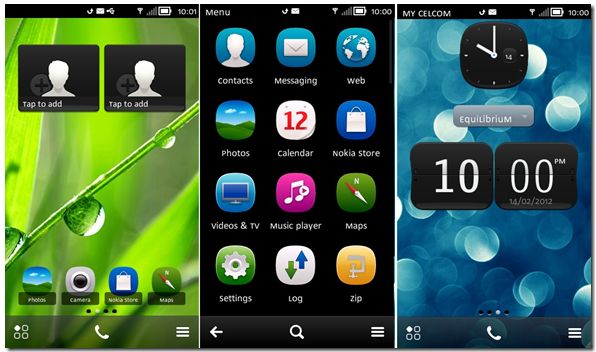
Today we are adding new application like Symbian Belle for your S60v5 Device. It whole look like Belle you can from below link. just click on the like download will start automatically. It's really working awesome you can see installed Belle app in Nokia C6 00.


Share this link to your Friends and Social Networks, If you have any Error just leave comment.

Wednesday, February 22, 2012

Free Avast Anti-Virus for Your Android Device

 Avast the big name in Antivirus world has released their Android app taking one step further in the world of malicious viruses which can ruin your device making it slow and buggy and hence sniffing stuff from your phone.
Well in regular day you transfer stuff, use Bluetooth and download media files from internet and many of those files contain viruses so getting a Antivirus on your device will protect you from any kind of threat and will maintain your device as fast as possible.


Key Features of Avast Antivirus :
1. Improved Virus Scanner.
2. Privacy Reporter.
3. Application Manager.
4. Enhanced Firewall.
5. Anti-Theft System.
6. SMS and Call Filtering Option.

Downloading and Installing :
You can download Avast Antivirus from android market here its totally free and can be downloaded right from your Android device just visit the above link on your device and than click on Install, now run it and update it after successful update just scan your device for harmful viruses.

Thursday, February 16, 2012

Swype beta Update for Android 4.0

The perennial beta version of the Swype keyboard for Android has been updated to support the latest version of the operating system. The keyboard, as you may be aware, relies on swipes on the keys to enter words, along with traditional text input where you can just press individual keys. The new beta also offers the ability to install additional languages for tablets and accuracy improvements.


To test out the new beta, I installed it on my phone to see how well it works. Despite being a beta, the application was just as stable as it has ever been, with no real bugs or issues. However, there are some thing about the way the keypad works that still bugs me.


For example, you still can’t double tap on the space key to insert a period, something that almost every other keypad does now. In the SMS view, there is no way to insert a new line into your message (as can be seen above), something that the default Android keypad cannot do either (but SwiftKey can). Also, if you choose to manually enter text instead of swiping, you’ll notice that the space bar is too small, and that the keys on the bottom, such as for voice input cannot be disabled. ICS also has its own drop down list of suggestions for misspelled words, which now overlaps that offered by Swype.
Other than that the keyboard works fine. The good thing about it is that you can use it one-handed. It’s especially convenient on phones with smaller displays, where two-thumb typing can be quite awkward. I’m just wondering why Nuance hasn’t released it on the Market yet.
To download Swype, click here to register for the beta program if you haven’t already. If you have then you should have the link mailed to you previously, which can be used to download the new version.

Make WiFi HotSpot Network in Windows XP - Vista


Windows XP :
1. Go to Control Panel and click on Network Connections.

2. Right click on the wireless connection and select properties.
3. Under the wireless networks tab check the box ‘Use Windows to configure my wireless network settings’.
4. Under Preferred networks click ‘Add’.
5. In the Network Name (SSID) box enter the name of your Wi-Fi network that you want to create.
6. Under Network Sharing, select the shared option. If you want your Wi-Fi connection to be encrypted then select WEP under data encryption.
7. Enter the password for your Wi-Fi network in the network key box and the confirm network key box. Click ‘ok’.

8.  Now you should the created Wi-Fi network in the box called preferred networks.
9. Click on Advanced. Under Networks to Access, tick the option ‘Computer to Computer (ad hoc) networks only’ and click on Close.
10. Click ‘ok’ to close the window and apply all settings.

11. Finally you need to change a setting in your wires internet connection.

For this .:
1. Go to Network connections.
2. Right click on Local Network Connection and select properties.
3. Click on the Advanced tab.
4. Under Internet Connection Sharing, tick the box ‘Allow other network users to connect through this computers’ internet connection’. Make sure that the box underneath it is not selected. If you check the second option then someone else who can login can change the settings.
5. Click ‘ok’ to apply settings and close the box.
Now, you should be able to find the Wi-Fi network on any other computer that can connect to Wi-Fi.

Windows Vista .:
This article will help you convert your Vista based laptop in a Wireless Hotspot. Once you setup your laptop as Hotspot  you do not need a router, switch, hub, etc… to form a network, in fact other laptops or PC’s can connect or access the internet through this newly created Hotspot.
  1. Go to Control Panel
  2. Click on “Network and Sharing Centre”
  3. Under Tasks choose “Setup New Connection”
  4. Wireless “Ad-hoc network”
  5. Now type in a “Network Name”
  6. Choose “WEP” password if you don’t want to share the connection with the entire world
  7. Click “Internet connection sharing”

Transfer Your Android Phone Data without any Cable

Software Data Cable for Android simply lets you enjoy your Android Device transfers wirelessly. It simply installs on your device as a normal app and than gives you an ip address and a port number which you can insert in your browser URL field and than it will simply display all the contents of your media card right in your browsers screen from where you can simply transfer any kind of stuff.


How to Use :

If you are interested in this app than you can get it below given link and after you have installed on your device simply fire it up and you will be given a simply IP Address and a Port Number just enter that in your browser URL field as instructed in the app and that it you will have the whole interface right in front of you.


Wednesday, February 15, 2012

YouTube Desktop Player


YTubePlayer is a desktop application that brings the YouTube experience to the comfort of your desktop.

With YTubePlayer you can:

Listen to your favorite YouTube streams in the comfort of your Desktop
Play feeds directly from YouTube, No download is needed
Take advantage of your Desktop Multimedia Keyboard – no more switching to your browser to choose the next song
Use the Toolbar mode to listen to your playlists in the background (the Toolbar is always on top)
Use built-in search facilities (Ctrl-F) to search directly on YouTube
Share your playlists by sending them to other YTubePlayers using the built-in “share” facilities
Create and manage your playlists in a click
Import existing YouTube playlists (coming soon!)

Download

Wednesday, January 25, 2012

Download Smart Widgets for your Android Teblet

Beautiful set of widgets including clock+weather, with some toggles
Beautiful set of Widgets containing clock widget, clock and weather widget, weather widgets, date widgets and toggle widgets with skins/themes support!
Selected by Google as an Android Editor's choice and first paid application to reach 1 million of downloads! What a success driven by its community!
See why it is the best Android clock and weather widgets and the only choice for thousands of users! You probably heard of Beautiful Widgets before!
Android Central: "We love Beautiful Widgets"
Android and Me: "Beautiful Widgets is one of the essential must-have Android apps, and has been for quite some time now. If you still haven’t managed to buy the app, there’s no time to waste."


ZDNet: "The strength of Android is the ability to make the interface very personal, and Beautiful Widgets is the daddy of them all."
Now with Honeycomb tablets support (ie the Motorola Xoom, Galaxy Tab)!
- High Definition Super Clock HD widgets available in many sizes and many layouts. High quality rendering and resizable with no loss of quality! 

- Display either the weather, battery icon (both with skins) or just a clock on the widget.
- 5 days Weather Forecast based on Google weather or Accuweather, with Geolocation support, automatic sunset/sunrise, also available on a weather only widget.
- Weather alerts (USA only), storm/rain/snow forecasts
- More than 15 nice Weather Animations (rain, storm, etc) for your pleasure when tapping the weather icon from the widgets.
- Moon phases, actual and a calendar for the next 4/5 phases
- Nice toggle widgets for Wifi, Bluetooth, Mobile, Brightness, GPS (shortcut), Silent, Vibrate, Plane Mode, 4G (only for a few HTC devices), Rotate, Pattern (below android 2.2) and a Timed Silence!
- More than 1000+ FREE Skins/Themes to changes the look and feel of you clock, weather icons or toggle buttons ! Impress your friends with your clock widget!
- Weather Live Wallpaper OpenGL accelerated (for supported devices only) which allow to display the weather live from your wallpaper, with many effects, physics and interactions!